MT5 Indicators: How to Organize a Practical Forex Chart Setup
MetaTrader 5 ships with 38 indicators and a market full of thousands more, and most traders respond by stacking six on one chart. This guide organizes MT5 indicators by the job each does, builds a three-template setup for bias, levels and execution, and explains the settings, panels and alert configuration that keep the chart readable.
MetaTrader 5 installs with 38 built-in indicators, and the Market tab offers thousands more. The problem for a forex trader is not finding an indicator but deciding which job each one does, because a chart that carries six of them is a chart on which nothing can be read. This guide sorts MT5 indicators by the four jobs an indicator can do, builds a practical three-chart setup from the built-in set, and covers the settings, templates and alerts that keep the setup fast. It assumes nothing beyond a standard MT5 installation.
Four jobs an indicator can do
| Job | Question | Built-in MT5 options | Pick one |
|---|---|---|---|
| Trend | Which way, and is there a trend at all? | Moving Average, ADX, Ichimoku, Parabolic SAR | A 50 EMA for direction; ADX for "is there a trend" |
| Volatility | How far does this market move, and is it expanding? | ATR, Bollinger Bands, Standard Deviation | ATR (14) — it sizes stops and targets |
| Momentum | Is the move accelerating or fading? | RSI, MACD, Stochastic, CCI, Williams %R | RSI (14) for divergence; MACD histogram if you prefer a bar view |
| Volume | How much participation is behind the move? | Volumes (tick), Money Flow Index, On Balance Volume | Tick volume on the execution chart only; real futures volume lives outside MT5 |
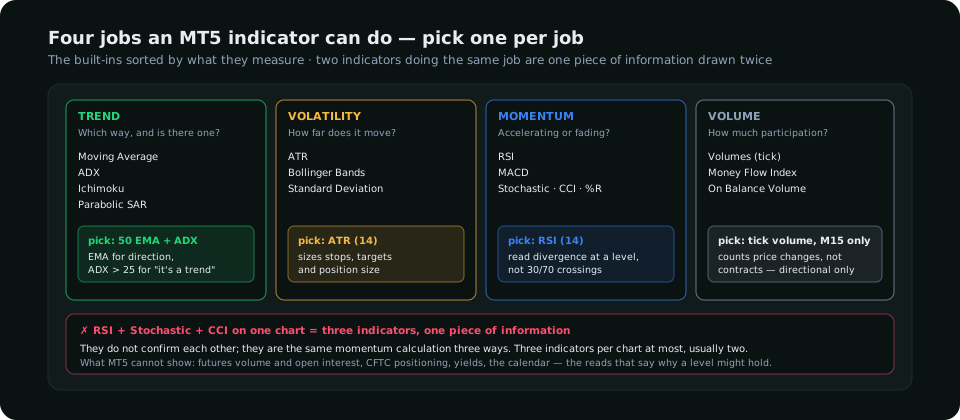
The principle is one indicator per job, and not every chart needs every job. Two indicators doing the same job (RSI and Stochastic, say) do not confirm each other; they are the same information drawn twice. The best forex indicators guide explains what each measures; the MT4 article covers the platform differences for traders still on the older version.
A three-template setup
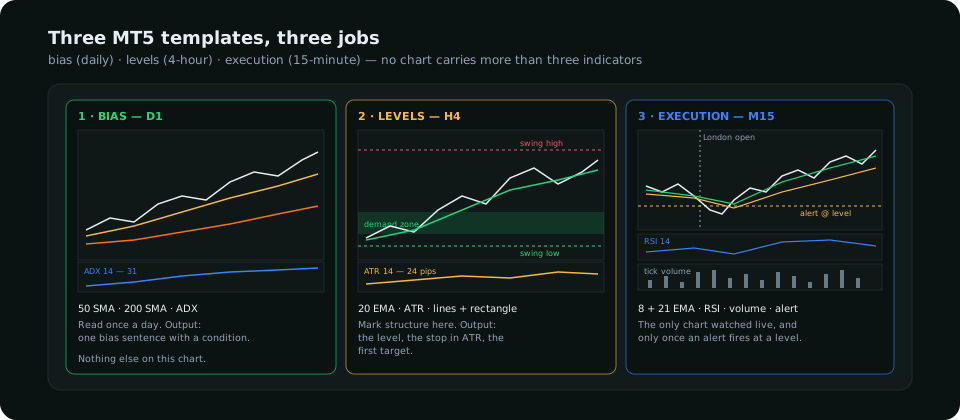
Template 1 — Bias (daily)
Candles, the 50 and 200 simple moving averages, and ADX (14) in a sub-window. The averages give direction at a glance — see the moving averages guide for reading slope and distance — and ADX above 25 says the direction is a trend rather than drift. Nothing else. The daily chart is read once a day for a one-sentence bias.
Template 2 — Levels (4-hour)
Candles, a 20 EMA, ATR (14) in a sub-window, and the drawing tools: horizontal lines on the last swing high and low, a rectangle on the demand or supply zone you intend to trade from. ATR is here because the stop and the first target are measured in it. This chart is where the structure is marked.
Template 3 — Execution (15-minute)
Candles, the 8 and 21 EMA for intraday momentum, RSI (14) for divergence at the level, tick volume as a rough participation gauge, a vertical line at the session open, and an alert line at the level from template 2. This is the only chart watched live, and only while price is near a level.
Settings that matter
| Indicator | Setting | Why |
|---|---|---|
| Moving Average | Method: Simple on the daily, Exponential intraday; Apply to: Close; Shift: 0 | SMA is calmer for bias; EMA faster for execution. Shift adds nothing but confusion. |
| ADX | Period 14; read the main ADX line, ignore +DI/−DI crossovers | The DI crossover is a late trend signal; ADX level is the useful part |
| ATR | Period 14 on every timeframe | Comparable across pairs; the ATR guide covers the uses |
| RSI | Period 14; levels 30/70 drawn but read divergence, not crossings | Overbought in a trend is normal; divergence at a level is the signal |
| Volumes | Tick volume; colour up/down | MT5 tick volume counts price changes, not contracts — directional only |
Templates and profiles: set up once
MT5 separates templates (one chart's indicators, colours and objects) from profiles (a whole workspace of charts). Build each of the three charts above, right-click → Templates → Save Template, and name them bias, levels, execution. Then open one window per pair you trade, apply the right template to each, and File → Profiles → Save As. A profile per routine (a "London" profile with the pairs that move in London, a "gold" profile) means the workspace reloads in one click. Templates also apply to any new symbol, so adding a pair takes seconds.
Alerts instead of watching
The execution chart earns its keep only while price is near a level, and MT5's alerts remove the need to stare. In the Toolbox → Alerts tab, add an alert with condition "Bid <" or "Bid >" at the level from template 2, with a sound and, if the MT5 mobile app is installed, a push notification (Tools → Options → Notifications, enter the MetaQuotes ID from the app). A trader with five pairs on watch sets five alerts at the Sunday review and opens charts only when one fires. The TradingView workflow article describes the same approach on that platform.
What MT5 indicators cannot show
Everything on an MT5 chart is derived from the price feed of one broker. It has no futures volume or open interest, no CFTC positioning, no yields and no calendar. Those are the reads that say why a level might hold, and they live outside the platform: the COT report for positioning, the exchange's reports for volume, FRED for yields. The practical workflow is to form the bias from those sources and the daily chart, then use MT5 for levels, execution and alerts. SMC Terminal exists to do the first half; MT5 does the second well.
Frequently asked
What are the best MT5 indicators for forex?
One per job: a 50 EMA and ADX for trend, ATR for volatility, RSI for momentum. The best setup is the one with the fewest indicators that still answers direction, distance and timing.
Can I use MT4 indicators in MT5?
Not directly; MT4's MQL4 files do not run in MT5. Most popular indicators have MT5 versions in the Market or Code Base, and all the built-ins above exist in both.
How many indicators should be on one chart?
Three at most, and usually two: one overlay (an average) and one sub-window (ATR, ADX or RSI depending on the chart's job).
Everything on SMC Terminal is analysis and education, not a recommendation to buy or sell. Settings are typical values for illustration. Trading carries a substantial risk of loss. Manage your risk.