MT4 Indicators Explained: Trend, Momentum and Volatility Tools
MetaTrader 4 and MT5 ship with dozens of indicators and the market for custom ones is endless, which is how a chart ends up unreadable. This guide sorts the MT4 & MT5 indicators into the three jobs they do — trend, momentum, volatility — recommends one built-in tool for each with settings, explains what custom indicators can and cannot add, and shows how to build a template that stays clean.
MetaTrader is the platform most forex brokers hand to a new account, and its indicator menu is the first thing a new trader opens. Thirty built-in studies, a marketplace of thousands more, and no guidance on which do what. The result is familiar: six indicators on one chart, each contradicting another. This guide groups the MT4 and MT5 indicators by the job they do, picks one built-in tool for each job with settings that suit forex and gold, and ends with a template that keeps the chart readable. Most of it applies to any platform; the specifics are MetaTrader's.
The three jobs
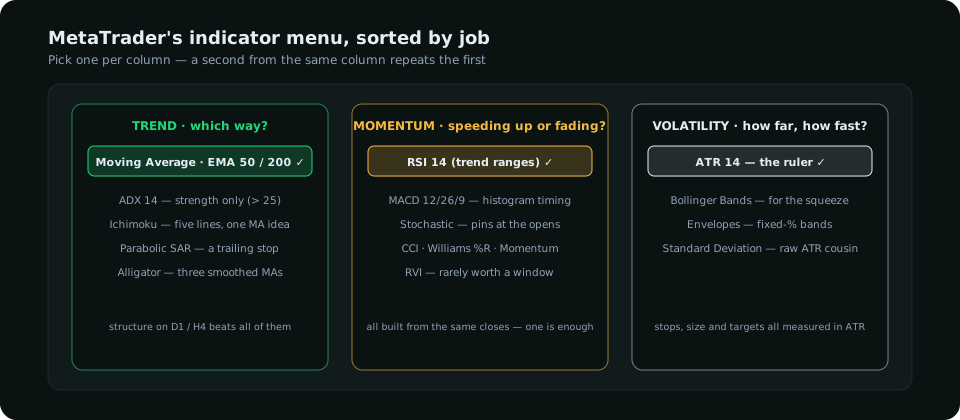
| Job | Built-in MT4 / MT5 indicators | Recommended | Settings for forex / gold |
|---|---|---|---|
| Trend | Moving Average, ADX, Ichimoku, Parabolic SAR, Bill Williams' Alligator | Moving Average (EMA) | 50 and 200 EMA on H4 / D1; ADX 14 optionally to confirm a trend exists (> 25) |
| Momentum | RSI, MACD, Stochastic, CCI, Williams %R, Momentum, RVI | RSI, or MACD for the histogram | RSI 14, read with trend ranges; MACD 12 / 26 / 9 |
| Volatility | ATR, Bollinger Bands, Envelopes, Standard Deviation | ATR | ATR 14 on every timeframe you trade |
Reading across the columns: ADX measures trend strength, not direction (it rises in a strong downtrend too); Parabolic SAR is a trailing-stop device, not an entry tool; the Alligator is three smoothed moving averages with a story attached. None of them says anything a 50/200 EMA and a glance at structure does not.
Trend tools: Moving Average and ADX
Add the Moving Average twice (Insert → Indicators → Trend → Moving Average): period 50 and period 200, method Exponential, apply to Close. Price above both with the 50 above the 200 is a bull phase; on gold especially this pair has a good record. The 4-hour 50 EMA doubles as a pullback guide in a trend.
ADX (14) answers one question: is there a trend to follow at all? Below 20 the market is ranging and trend tools will whipsaw; above 25 a trend is in force. Use it as a permission filter, not a signal. The trend indicator comparison goes deeper.
Momentum tools: RSI and MACD
Both appear under Oscillators. RSI at 14 is the simpler; the RSI guide explains why 70/30 must become 80/40 in an uptrend. MACD in MetaTrader draws the histogram as the MACD line itself and the signal as a line over it — a presentation quirk: the "histogram" you see is MACD − zero, not MACD − signal as on most platforms. Read the bars against the signal line, or install a standard two-line MACD, and follow the MACD guide from there. Pick one of the two; stacking RSI, MACD and Stochastic is one opinion three times.
Volatility tools: ATR above all
ATR (14) is the indicator to keep on every chart, because it is a ruler, not a signal: stops go beyond structure plus a fraction of ATR, size follows from the stop, targets are measured in ATR, and a 14-day ATR against its longer average tells you whether the market is coiling or extended. The gold indicators guide shows the regime read; the volatility guide covers the measures. Bollinger Bands (20, 2) earn their place for the squeeze — band width narrowing before an expansion — not for "touch the band, reverse", which fails in trends.
Custom indicators: what they add and what they don't
MetaTrader's custom indicators (.ex4 for MT4, .ex5 for MT5, installed via File → Open Data Folder → MQL4/MQL5 → Indicators) are where most of the noise lives. Three categories are genuinely useful:
- Session boxes that shade Asia, London and New York on the chart. The sweeps that matter cluster at the opens; seeing the sessions is worth more than any oscillator.
- Structure helpers that mark swing highs and lows or previous-day / previous-week highs and lows. They save drawing time; they do not replace judging which swings count.
- Alert utilities that fire on a level touch or a candle close beyond a line, since MT4's native alerts are basic.
What custom indicators cannot add is information that isn't in price: who is positioned, where rates are going, what the retail crowd is doing. A "smart money" indicator on MT4 is still computed from the same OHLC candles as everything else; the actual positioning data lives in the CFTC's weekly report, and the research dashboard or a spreadsheet is where it belongs, beside the chart rather than painted onto it.
A clean MT4 / MT5 template
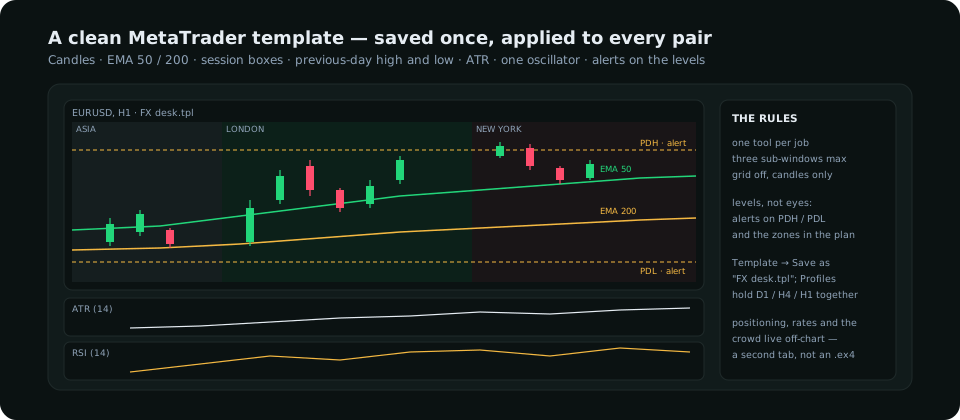
- Candles only (Charts → Candlesticks), a dark or plain background, grid off.
- EMA 50 and 200 on the main window.
- Session box indicator for Asia / London / New York, and previous-day high and low (a free custom indicator or two horizontal lines each morning).
- ATR 14 in a sub-window; RSI 14 (or MACD) in a second. Nothing else.
- Right-click → Template → Save Template as
FX desk.tpl. Apply it to every chart; use Profiles to save a set of charts (D1 / H4 / H1 for one pair). - Alerts (Tools → Options → Alerts, or right-click a level → Trading / Alert): set them at the zones you would trade, so the platform watches and you don't.
MT4 versus MT5, briefly
| MT4 | MT5 | |
|---|---|---|
| Indicators | 30 built-in, huge .ex4 library | 38 built-in, .ex5; MT4 files don't run on MT5 |
| Timeframes | 9 | 21 (adds 2-, 3-, 6-hour etc.) |
| Markets | Forex and CFDs | Adds exchange-traded futures and stocks where the broker offers them |
| Depth of market | No | Yes, where the broker provides it |
| Choose if | Your broker and your custom tools are MT4-only | Starting fresh — it is the maintained platform |
The rule that keeps the chart readable
One tool per job, three sub-windows at most, and a reason you can state for each. If you cannot say which decision an indicator changes — the bias, the level, the size or the exit — it comes off. The chart's purpose is to show structure and the session; the indicators are there to support reading it, not to replace it.
Everything on SMC Terminal is analysis and education, not a recommendation to buy or sell. MetaTrader is a third-party product; menu paths and features vary by version and broker. Trading carries a substantial risk of loss. Manage your risk.