How to Build a Forex Analysis Workflow in TradingView
A TradingView forex strategy is only as good as the routine around it. This tutorial builds a repeatable analysis workflow from scratch: the layout, the watchlist, a three-timeframe template, the drawing conventions that keep charts readable, alerts that do the waiting for you, and a daily sequence that takes twenty minutes and ends with a written plan.
Most traders use TradingView the way they use a web browser: open a chart, look around, close it. The platform rewards a different approach. Set up once as a system — layouts, templates, a watchlist, alerts, a sequence — it turns analysis into a routine that takes the same twenty minutes every day and produces the same kind of output: a written plan. This tutorial builds that system from an empty account. Nothing here needs a paid plan beyond the alert limits mentioned, and every step works on the free tier with fewer charts per layout.
Step 1 — Decide the universe first
A workflow for "forex" is a workflow for nothing in particular. Decide what you actually trade. A sensible starting universe is the seven majors, two or three crosses you understand, gold, and one index — about twelve instruments. More than twenty and the daily routine stops fitting in twenty minutes; fewer than eight and there is rarely a setup. Put them in a single watchlist, in a fixed order (majors, crosses, metals, indices), and never add to it mid-session.
Step 2 — Build the layout
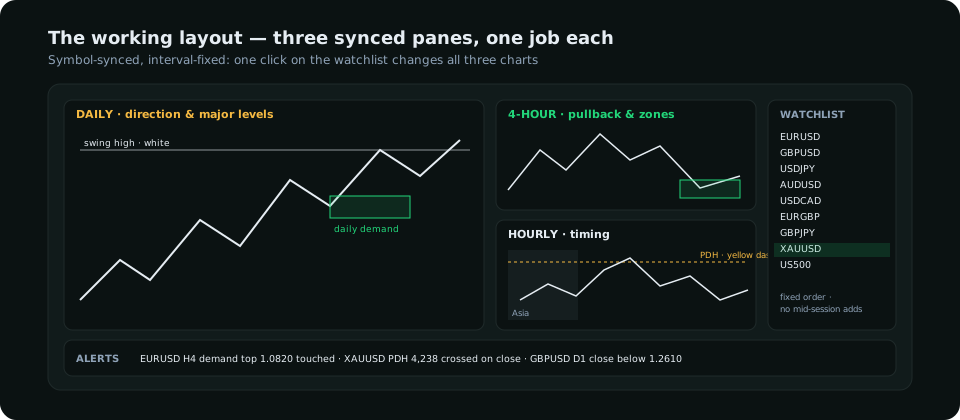
Use a three-pane layout with the panes symbol-synced (so one click on the watchlist changes all three) but not interval-synced, so they hold daily, 4-hour and hourly permanently. Each pane has one job, and the division keeps you from reading an hourly trigger as a daily bias:
| Pane | Timeframe | Job | What is drawn on it |
|---|---|---|---|
| Left (largest) | Daily | Direction and major levels | Swing highs and lows, previous week's high and low, the daily zone in play |
| Top right | 4-hour | Pullback and zones | Supply / demand zones that produced structure breaks, the 4-hour higher low or lower high that must hold |
| Bottom right | Hourly | Timing | Session highs and lows, equal highs / lows, the current sweep and shift |
Save it as a named layout ("FX desk") and save a chart template with your colours, candle style and the few indicators you use. Apply the template to every pane so a chart on EUR/USD looks like a chart on gold.
Step 3 — Keep indicators to what you will act on
A workflow fails when the chart is unreadable. Two or three indicators are enough, each with a defined role; the TradingView indicators guide compares the candidates. A defensible default set:
- ATR (14) on every pane — stops and "is this move significant" are both measured in it.
- Session boxes (a free community script that shades Asia, London and New York) on the hourly — the sweep-and-shift entries cluster at the opens.
- One momentum oscillator, if you use one, on the 4-hour only, read as described in the RSI guide: for regime and divergence, never for overbought/oversold on its own.
Anything that duplicates price (moving averages beyond one, bands, multiple oscillators) goes. If you cannot say what decision an indicator changes, it is decoration.
Step 4 — Drawing conventions
Objects pile up. A convention keeps the chart legible and makes your own analysis readable a week later:
| Object | Colour | Rule |
|---|---|---|
| Daily swing levels | White, solid | Extend right; delete when broken and re-marked |
| Supply zone | Red rectangle, 10% opacity | From the candle that caused the break; delete after it has been traded through |
| Demand zone | Green rectangle, 10% opacity | Same |
| Liquidity pool (equal highs / lows, PDH / PDL) | Yellow, dashed | Hourly only; cleared each morning |
| Planned trade | Long / short position tool | Entry, stop and target set before the session — it is the plan, not a doodle |
Use the object tree to lock the daily levels so a stray drag does not move them, and use "visibility by timeframe" so hourly pools do not clutter the daily pane.
Step 5 — Alerts replace screen-watching
This is the step that changes how the day feels. A workflow with alerts means you are not watching candles; you are told when something you already decided on has happened. Three kinds of alert cover almost everything:
- Price crossing a level — the top of the 4-hour demand zone, the previous day's high, the equal highs. "Crossing" rather than "greater than", once per bar close on the hourly, so that a wick does not fire it.
- Alert on a drawing — right-click a rectangle or trend line and set an alert on it; the zone itself becomes the trigger.
- Watchlist alerts for the daily close crossing a swing level on any symbol — the "something changed direction" alert for the whole universe.
Keep alert messages explicit — "EURUSD H4 demand top 1.0820 touched" — and send them to the mobile app so the trigger reaches you away from the desk. The free plan allows a handful of active alerts, which is a feature: it forces you to keep only the ones attached to a real plan.
Step 6 — The twenty-minute daily sequence
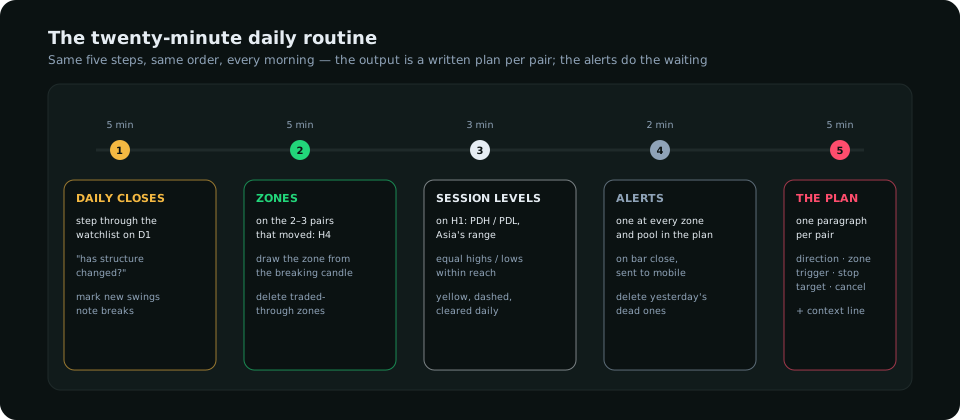
- Daily closes (5 min). Step through the watchlist on the daily pane. For each symbol, one question: has the structure changed since yesterday? Mark any new swing; note any break. Most days nothing changes on most symbols.
- Zones (5 min). On the two or three symbols that moved, update the 4-hour pane: draw the zone from the candle that caused the break, delete the zone that was traded through.
- Session levels (3 min). On the hourly, mark the previous day's high and low and Asia's range (the session script does the range for you). Note equal highs or lows within reach.
- Alerts (2 min). Set or update the alert at each zone and pool you would actually trade. Delete yesterday's dead alerts.
- The plan (5 min). One paragraph per symbol with a setup: direction, zone, trigger, stop, target, and what would cancel it. Write it in the notes panel or a text file, with the date.
The plan is the product. Everything else is preparation for writing it. A trader who writes the paragraph and then only acts on alerts that match it has removed most of the ways to lose money in a day.
What TradingView does not give you
A chart platform shows price. It does not show who is positioned (the CFTC's report), what the dollar's drivers are doing, where the week's red events fall, or what the retail crowd is leaning on. Those inputs change the odds on a setup that looks identical on the chart, and the workflow should include a place for them: a second tab with the economic calendar, a weekly note from the COT report, and a yields chart — or a research dashboard that puts them beside the chart. Add it to step 5: a line in the plan that says whether the context supports the setup or argues with it.
Checklist to set it up today
- Watchlist of eight to fifteen symbols in a fixed order
- Three-pane layout, symbol-synced, intervals fixed at D / H4 / H1, saved
- One chart template applied everywhere; two or three indicators with a role
- Drawing colours and deletion rules written down
- Alerts at every zone in the plan, sent to mobile, on bar close
- A dated plan file, one paragraph per symbol, updated every morning
Everything on SMC Terminal is analysis and education, not a recommendation to buy or sell. TradingView is a third-party product; feature names and plan limits change — check the current documentation. Trading carries a substantial risk of loss. Manage your risk.