Forex Market Scanners: How to Find Pairs Worth Analysing
A forex market scanner answers the question that comes before analysis: of the thirty or forty pairs available, which three deserve twenty minutes this morning? This guide sets out what a scanner should filter on (bias alignment, positioning room, structure state, volatility, the calendar), how to rank the survivors, the filters that look useful and are not, and how to build a workable scan with a spreadsheet before buying one.
A forex market scanner solves a problem of attention, not analysis. There are seven majors, twenty or so crosses, gold, silver, oil and a few indices on most platforms, and a trader has perhaps an hour before a session. Analysing all of them properly is impossible; analysing the same three every day misses the pairs where the setup actually is. A scanner is the filter in between: a set of fast, mechanical checks that reduce the universe to the handful worth the twenty-minute read. This guide sets out which checks earn a place in the scan, how to rank what survives, the checks that look rigorous and produce noise, and how to build the scan yourself before deciding whether to pay for one.
What the scan is for
A scanner is not a signal generator. Its output is a short list, ranked, with the reason each pair made the list, and the analysis that follows is the same whether the pair came from a scanner or from habit. The distinction matters because scanners sold as "find the best trades" are scanners that have taken over the decision, and the decision is the one part of the process that should not be mechanical. The market analysis routine is what the scanner feeds; the scanner's job is to make sure the routine is spent on the right pairs.
The five filters
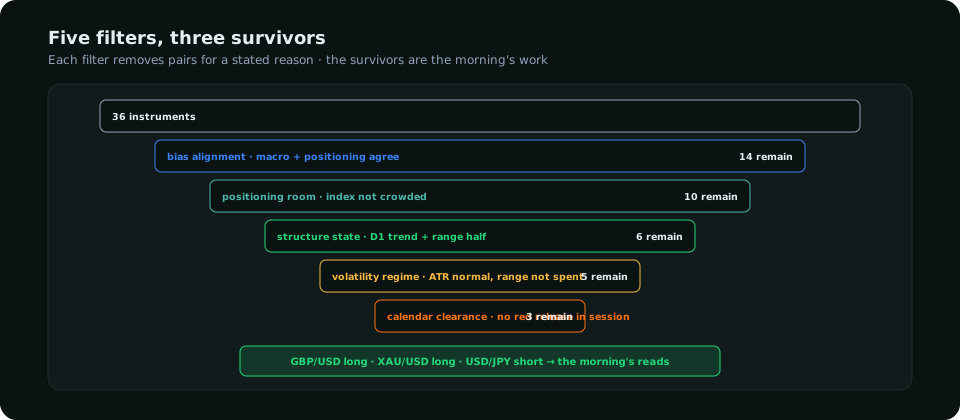
| Filter | Check | Passes when | Source |
|---|---|---|---|
| 1 · Bias alignment | Macro bias (rate differential direction) and positioning bias (COT weekly change direction) for the pair | Both point the same way | 2-year spread change; COT weekly change |
| 2 · Positioning room | Speculative COT index in the bias direction | Not in the crowded band (below 85 for longs, above 15 for shorts) | COT index |
| 3 · Structure state | Daily trend by swings; position in the daily range | Trend matches the bias; price in discount for longs, premium for shorts, or at a zone | Daily chart |
| 4 · Volatility regime | 14-day ATR vs its 90-day average; today's range vs ATR | ATR between 0.7× and 1.5× its average; less than 60% of the ATR used today | ATR |
| 5 · Calendar clearance | Red releases for either currency in the next session | None, or the plan is for after the release | Calendar |
Filters 1 and 2 are weekly inputs that change slowly; 3 changes at each daily close; 4 and 5 are daily checks. A scan that runs the slow filters once on Sunday and the fast ones each morning takes a few minutes. The analysis tools guide covers where each input comes from.
Ranking the survivors
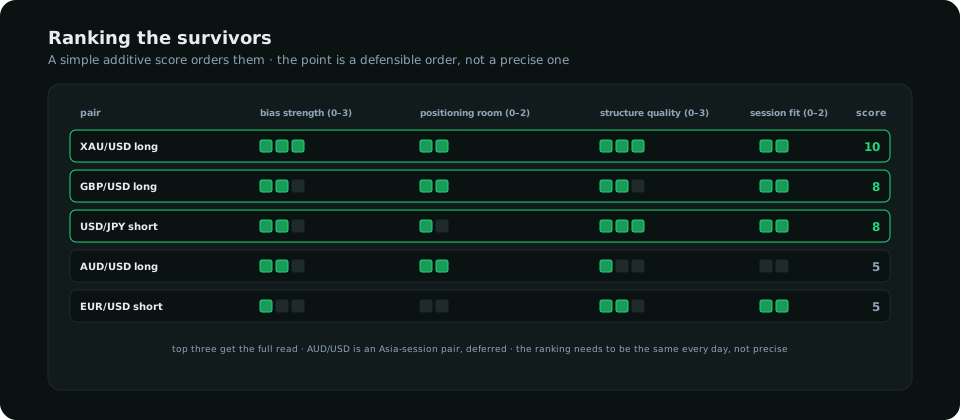
Score each survivor on four things: bias strength (how many of the terminal's reads agree), positioning room (how far the COT index is from crowded), structure quality (trend plus range position plus proximity to a zone), and session fit (is the pair active in the session about to open). Add them. The top three get the full read; the rest are noted for later. The ranking does not need to be precise; it needs to be the same every day, so that the choice of which pairs to analyse is not made by whichever chart was open last.
Filters that look useful and are not
- Indicator states. "RSI below 30" or "MACD cross" on thirty pairs produces a list of pairs in pullbacks and pairs in downtrends with no way to tell them apart. Indicators belong on the chart after the scan, if anywhere.
- Pattern recognition. Automated flag and wedge detection fires constantly and is wrong about structure more often than it is right; the automation guide explains why interpretation needs validation a scanner does not perform.
- Percentage change rankings. "Top movers today" lists the pairs that have already moved, which is the opposite of what a day trader wants at the open.
- Retail sentiment ratios. A single broker's client positioning is a small, biased sample; as a filter it removes pairs for reasons that may not exist.
- Correlation heat maps. Useful for sizing (three dollar pairs are one trade), useless for finding setups.
Building the scan yourself
A spreadsheet with one row per pair and one column per filter is a working scanner. The weekly columns (2-year spread change per currency, COT weekly change and index per market) take an hour on Sunday from free sources; the daily columns (daily trend, range position, ATR, range used, next red release) take ten minutes each morning from the chart and the calendar. Conditional formatting turns passes green and the scan reads itself. The limitation is maintenance: the COT processing in particular is where most traders stop updating after a month, which is the gap an integrated terminal fills. SMC Terminal's scanner runs the first three filters across its universe from the same positioning, valuation and macro reads that build each pair's bias, and shows the result as a ranked board; the dashboard guide describes the panels around it.
What the scanner must not do
It must not pick the trade. A pair at the top of the list is a pair worth twenty minutes, not a pair to buy; the read that follows may well end in no trade, and a scanner whose top result is taken without that read has become a signal service. It must not change its rules daily; the value of a scan is that the same pairs would surface for any trader running it. And it must not replace the weekly macro and positioning work; it consumes that work, and a scan fed stale inputs produces a confident, wrong list. The COT guide covers the weekly input the scan depends on most.
Frequently asked
What is a forex market scanner?
A set of mechanical filters that reduces the available pairs to the few worth analysing in a session, ranked with reasons. It is a filter for attention, not a signal generator.
What should a forex scanner filter on?
Bias alignment between macro and positioning, positioning room, daily structure state, the volatility regime and calendar clearance. Indicator states and pattern detection produce lists that cannot be acted on.
Can I build a forex scanner in Excel?
Yes: one row per pair, one column per filter, weekly inputs updated on Sunday and daily ones each morning. The positioning columns are the ones that need discipline to keep current.
Everything on SMC Terminal is analysis and education, not a recommendation to buy or sell. Figures in the example are illustrative. Trading carries a substantial risk of loss. Manage your risk.