Forex Trading Dashboard: What to Track Before Entering a Trade
A forex trading dashboard is only useful if every panel answers a question you would otherwise have to go and look up before a trade. This guide lists the eight things worth tracking, in the order they are consulted, explains what each one tells you and what it cannot, and shows how to arrange them so a pre-trade check takes two minutes rather than twenty tabs.
A forex trading dashboard is a set of answers, not a set of charts. The trader who checks positioning on one site, the calendar on another, yields on a third and the session time in their head will skip one of them on the day it matters. The purpose of a dashboard is to put every pre-trade question on one screen so the check is quick enough to do every time. This guide sets out what belongs on it, in the order a trader consults it, what each panel contributes, and the panels that look impressive and add nothing.
The eight panels
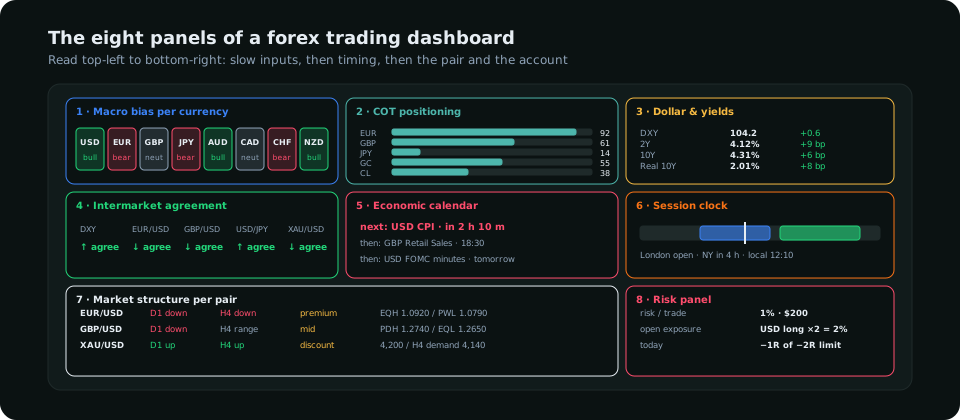
| # | Panel | The question it answers | Refresh |
|---|---|---|---|
| 1 | Macro bias per currency | Which currencies should be gaining over weeks? | Weekly, after data |
| 2 | COT positioning | Is the crowd already there, and did they add this week? | Friday |
| 3 | Dollar and yields | Is the dollar's own driver supporting or fighting my pair? | Daily |
| 4 | Intermarket agreement | Are the related pairs and the dollar index confirming? | Live |
| 5 | Economic calendar | Is a red release inside my holding window? | Daily |
| 6 | Session clock | Is the pair in an active session right now? | Live |
| 7 | Market structure per pair | Which way is price travelling, and where in its range is it? | Each close |
| 8 | Risk panel | How much can I risk, and how much is already at risk? | Live |
Panels 1–3: the slow inputs
The macro bias strip reduces each currency to one tag from its rate expectations and recent data: bullish, bearish, neutral. A pair's bias is the difference between its two tags; EUR (bearish) against USD (bullish) is a short bias before any chart is opened. It changes weekly at most. The COT panel shows, per market, the speculative net, its weekly change and its place in the three-year range, which tells you whether the macro bias is already crowded. The forex COT guide explains how to read it; the panel's job is just to make it visible without a trip to the CFTC site. The dollar and yields panel shows the dollar index, the 2-year and 10-year yields and the real yield with their weekly changes, because nearly every major pair is a dollar pair and the dollar moves on its yields. Three numbers and their direction are enough.
Panels 4–6: timing
Intermarket agreement is the check that a single pair is not moving alone. If EUR/USD is rising while the dollar index is also rising and GBP/USD is falling, something is wrong with the euro move, and lone moves reverse. A simple panel listing the related pairs and the dollar index with their direction over the past few hours does this. The calendar needs to show the next high-impact release for each currency with a countdown, not the whole week's list; the trader's question is "is there one in the next two hours", and a highlighted next event answers it. The session clock shows the London and New York windows in the trader's own time zone, because the mental conversion is where mistakes happen; the session guide explains which pairs move in which windows.
Panels 7–8: the pair and the account
The structure table gives each pair's daily and four-hour trend (higher highs or lower lows), its position in the dealing range (premium or discount) and the nearest liquidity above and below. It is the chart reduced to the facts that decide direction and location, so that the chart itself is opened only for the trigger. The risk panel shows the fixed risk per trade in currency, the exposure already open (summed by currency, so two long-dollar positions show as one dollar exposure), and today's realised result against the daily loss limit. It is the panel most dashboards omit and the one that saves the most money: a trade that is fine in isolation is not fine as the fourth long-dollar position of the day.
The pre-trade flow
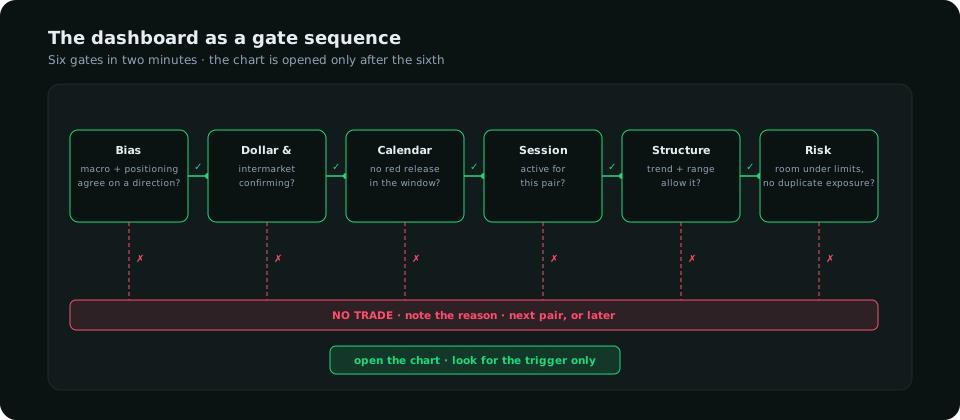
Read top-left to bottom-right, the panels form a gate sequence that takes about two minutes. The direction comes from panels 1 and 2; panels 3 and 4 confirm or veto it; 5 and 6 decide whether now is a time to act; 7 confirms the pair's own structure allows it; 8 confirms the account can take it. Only then is the chart opened, and only to look for a trigger in the allowed direction. The daily workflow guide builds the same sequence into a morning routine.
What to leave off
- Price tickers for twenty pairs. Prices are on the chart; a ticker wall is decoration.
- Sentiment widgets from a single broker. Retail positioning is useful as a contrarian read, but one broker's clients are a small, biased sample. Use it as a footnote, not a panel.
- News headlines. They are late, unranked and mostly noise. The calendar covers the scheduled events; the unscheduled ones show up in the dollar and yields panel first.
- Indicator readings (RSI, MACD values) per pair. They belong on the chart where the context is, if anywhere.
- Profit-and-loss in large type. It changes behaviour; the risk panel shows result against the limit, which is the only form of it that helps.
Building versus buying
A trader can assemble panels 3, 5 and 6 from free sources in an afternoon with a spreadsheet and a calendar feed; panels 1, 2 and 7 take real work to keep current (weekly COT parsing, yield history, structure per pair across timeframes). The analysis software comparison covers what to look for if buying, and the trading tools guide covers the pieces. SMC Terminal was built as the eight panels above: a per-pair bias composed from positioning, valuation, macro and intermarket reads, the calendar and session clock in the member's own time zone, and the structure read per pair, so that the pre-trade check is the home screen rather than a tour of tabs.
Frequently asked
What should a forex dashboard show?
The answers to the pre-trade questions: bias, positioning, the dollar's driver, intermarket agreement, the next release, the session, the pair's structure and the account's risk. Eight panels; anything else is optional.
Do I need a dashboard to trade forex?
You need the information. The dashboard is what makes checking it fast enough to do every time, which is the difference between a routine and an intention.
How often should the dashboard update?
Each panel at the pace its data changes: macro weekly, COT Friday, yields daily, the calendar daily, the session clock and intermarket panel live, structure at each candle close.
Everything on SMC Terminal is analysis and education, not a recommendation to buy or sell. Figures in the example are illustrative. Trading carries a substantial risk of loss. Manage your risk.