Essential Forex Trading Tools: From Market Analysis to Risk Management
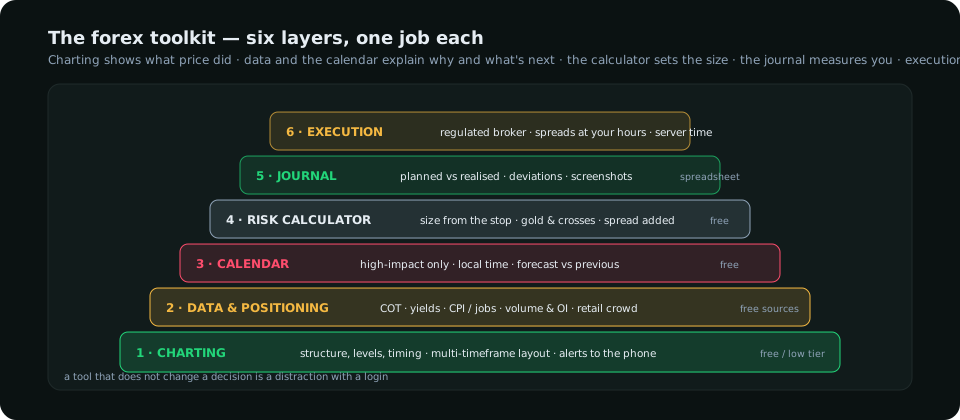
The forex trading tools that matter fit in six categories: charting, data and positioning, the calendar, risk calculators, a journal, and execution. This guide explains what each category is for, what to look for when choosing, which ones are free, and how to assemble them into a stack that supports a method instead of distracting from it.
A new trader's toolkit tends to grow by accumulation — an indicator here, a signal channel there, three news sites, two calendars — until the desk is a wall of inputs and none of them is decisive. A working trader's toolkit is the opposite: a small set of tools, each with one job, assembled around a method. This guide organises forex trading tools into the six jobs that need doing, explains what to look for in each, and shows how they fit together. Most of the stack can be free; what it cannot be is accidental.
The six jobs
1. Charting — seeing structure
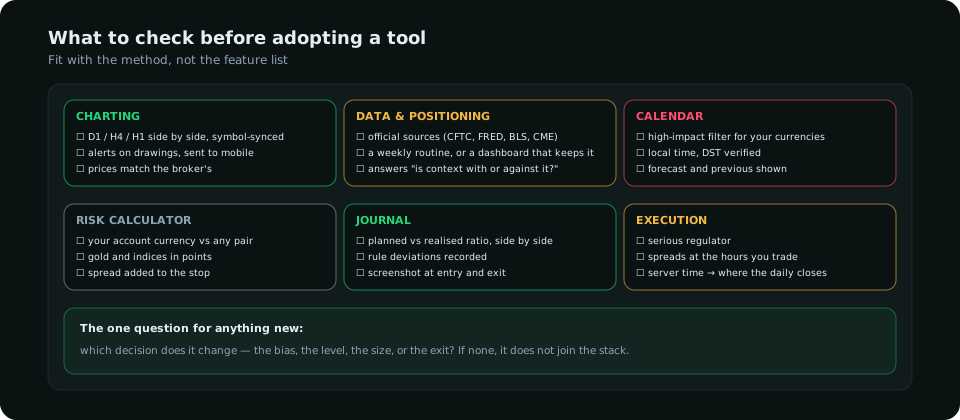
The chart is where structure, levels and timing are read, and it is the tool most traders already have. What matters when choosing:
- Multi-timeframe layouts that can hold the daily, 4-hour and hourly side by side and sync the symbol. Reading structure across three timeframes on one chart by switching intervals is slower and error-prone.
- Reliable alerts on price levels and drawings, delivered to a phone. Alerts are what turn a chart from something you watch into something that calls you.
- A clean drawing set — rectangles for zones, position tools for planning, and object management so the chart does not silt up.
- Data quality: a feed that matches your broker's prices closely enough that levels line up.
TradingView is the default for most retail traders for the first three reasons; the workflow guide shows how to set it up, and the indicator guide how to keep it uncluttered. The broker's own platform (MT4/MT5, cTrader) also charts well enough; it is just weaker on layouts and alerts.
2. Market data and positioning — seeing who is driving
A chart tells you what price did. It does not tell you that speculators are at a record net long in gold, that real yields have risen for three weeks, or that the retail crowd is 78% long on a pair that is falling. These inputs change the probability of a setup that looks identical on the chart, and the sources are mostly free:
| Input | Source | Cost | Cadence |
|---|---|---|---|
| Speculative positioning | CFTC Commitments of Traders report | Free | Weekly, Friday |
| Rates and yields | FRED (Federal Reserve Bank of St. Louis), Treasury | Free | Daily |
| Inflation and jobs data | BLS, national statistics offices | Free | Monthly |
| Futures volume and open interest | CME Group daily reports | Free | Daily |
| Retail positioning | Broker sentiment pages, Myfxbook outlook | Free | Live / hourly |
| All of the above, pre-processed into reads | Research dashboards (this one among others) | Subscription | Daily / live |
The raw sources cost nothing but time — a Friday hour for the COT report, a daily look at yields. A dashboard pays for itself only when it saves that time reliably; the data underneath is the same. Either way, the job is to answer, for each setup, "is the context with it or against it?" before the trade. The COT in forex and fundamental analysis guides cover the two biggest inputs.
3. The economic calendar — knowing what is next
Every day trader needs to know, before the session, when the red events fall. A release can gap through a stop, invalidate a structure, or decide the direction of the entire day. The calendar is the simplest tool in the stack and the most often skipped:
- Filter to high-impact only for the currencies you trade; the rest is noise.
- Show times in your own zone and check the daylight-saving status — a one-hour mistake on US CPI is expensive.
- Note forecast and previous; the surprise relative to forecast is what moves the market, not the number itself.
Forex Factory, Investing.com and most brokers provide a free calendar; the best time to trade forex guide explains how the releases sit inside the session clock.
4. Risk and position-size calculators — setting the size
The one tool that directly controls losses. A position-size calculator takes the account, the risk percentage and the stop distance and returns the lot size; the position size guide has the formula and the pip-value tables so you can check it by hand. Requirements:
- Handles your account currency against any pair, including crosses and yen pairs.
- Handles gold and index CFDs in points, not pips — the place where currency-only calculators give dangerous answers.
- Lets you add the spread to the stop.
Most brokers provide one; several free websites do; a spreadsheet with four cells does. The tool is trivial. Using it on every trade is the discipline.
5. The journal — recording what actually happened
The journal is the tool that improves all the others, because it is the only one that measures you. The minimum record per trade:
| Field | Why |
|---|---|
| Setup type and timeframe | So results can be split by method |
| Planned entry, stop, target and ratio | The plan as written before the trade |
| Realised entry, exit and ratio | The gap between planned and realised is the most honest review you will get |
| Context reads at the time (positioning, drivers, calendar) | To learn which context actually mattered |
| Rule deviations | Moved stop, early exit, added size — the behaviour to fix |
| A screenshot at entry and at exit | Memory rewrites charts; screenshots do not |
A spreadsheet works. Dedicated journal apps add analytics and automatic import from the broker, which helps once the sample is large. What does not work is a journal without the "planned versus realised" columns — it records trades without measuring the trader.
6. Execution — the broker platform
The broker's platform is where orders are placed, and it should be chosen on things the chart cannot show: regulation in a serious jurisdiction, typical spreads on the pairs you trade at the hours you trade them, execution quality during news, and the server time (which decides where the daily candle closes — a detail that changes the structure you read). The platform guide works through the comparison. Keep execution separate from analysis: analyse on the charting tool, execute on the broker, and do not let the broker's platform become the place where you make decisions in a hurry.
Assembling the stack
A complete, inexpensive stack looks like this:
- Charting: TradingView (free or a low tier for more alerts), three-pane layout, two or three indicators.
- Data: a Friday routine for the COT report; a yields chart; a sentiment page — or one dashboard that gathers them.
- Calendar: one free calendar, high-impact filter, local time, checked every morning.
- Calculator: the broker's or a spreadsheet, used before every entry.
- Journal: a spreadsheet with planned-versus-realised columns and screenshots.
- Execution: one regulated broker with tight spreads at your hours.
Six tools, six jobs, and a routine that runs through them in order every day. Anything added to the stack should displace something or be refused; the test is whether it changes a decision. A tool that does not change decisions is a distraction with a login.
Everything on SMC Terminal is analysis and education, not a recommendation to buy or sell. Third-party tools are mentioned as examples, not endorsements; features and pricing change. Trading carries a substantial risk of loss. Manage your risk.