TradingView Indicators: How to Choose Tools for a Forex Trading Plan
TradingView has more than a hundred thousand community indicators and the average chart built from them is unreadable. This guide is a selection method: start from the decisions your plan makes, pick one tool per decision, set it up once, and know which built-ins beat the popular scripts.
Open the indicator library on TradingView and search "smart money". You will get thousands of results, most of them drawing coloured boxes on every candle, many of them repainting, nearly all of them answering a question nobody asked. The library is not the problem — it is a superb tool. The problem is choosing from it without a plan, which turns a chart into a dashboard of things that happened.
This guide is a selection method rather than a list. It starts from the decisions a trading plan actually makes, matches one tool to each, and then covers the built-in indicators that quietly outperform the popular community scripts.
Start from the decisions, not the indicators
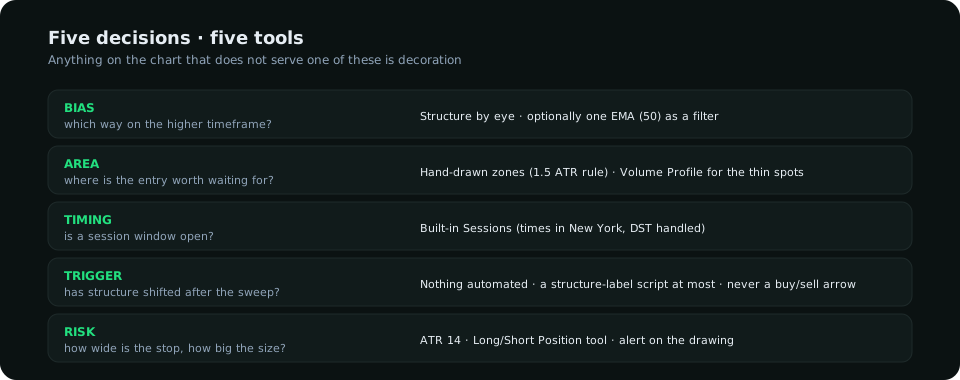
A complete intraday forex plan makes five decisions. Each needs at most one tool.
| Decision | Question | Tool |
|---|---|---|
| Bias | Which way on the higher timeframe? | Structure by eye, optionally one EMA (50) as a filter |
| Area | Where is the entry worth waiting for? | Manual zones + the built-in Volume Profile for where volume was absent |
| Timing | Is a session open? | The built-in "Sessions" indicator or session-background script |
| Trigger | Has structure shifted after the sweep? | Nothing automated — a structure-labelling script at most, never a "buy/sell" signal script |
| Risk | How wide is the stop and how big is the position? | ATR + the built-in Long/Short Position tool |
The built-ins worth using
- ATR (14). The one indicator that belongs on every chart. Stop distance, target reach, "is this zone close" — all in pips. See what each indicator measures for why volatility is the question most traders forget to ask.
- Sessions. Shades Asia, London and New York on the chart. The killzone rule — triggers only inside a window — is impossible to follow without it. Set the times in New York time and let the tool convert; the DST changes are then handled for you. (The windows in Pakistan and Gulf time.)
- Volume Profile (Visible Range / Session). Where volume was thin is where price moves fast and where fair value gaps live; where it was thick is where price stalls. The high-volume node is the day's fair value; a move away from it with no volume is the one that comes back.
- Anchored VWAP. Anchor it to the session open, the last swing low or the data release, and you have the average price paid since that moment — the level institutions defend.
- Long / Short Position tool. Draw the entry, stop and target and it shows the reward-to-risk and the position size for your account and risk. Use it before every trade; it ends the habit of sizing by feel.
What to avoid in community scripts
- Repainting. If a signal appears on a closed candle and later disappears, the script is using future bars. Test any script on bar replay before trusting a backtest.
- Signal scripts. "Buy" and "sell" arrows from an unknown rule set are someone else's plan, usually a crossover in disguise. You cannot size, journal or improve what you do not understand.
- Auto-drawn SMC boxes. The good ones label structure and leave you the decision. The bad ones draw an order block on every candle, so that something is always "in a zone". Check the rule the script uses to define a zone; if it has no minimum move, delete it.
- Twelve-indicator templates. Five tools above is the ceiling. The chart should be mostly candles.
A clean layout, once
- Two charts side by side: the planning timeframe (4-hour) and the execution timeframe (1-hour or 15-minute), synced by symbol.
- On both: ATR in a small pane, Sessions shaded faintly, your zones drawn by hand with the rule you use (the terminal's: last opposing candle before a move of 1.5 ATR, deleted once closed through).
- On the execution chart only: Anchored VWAP from the session open, Volume Profile for the session.
- Save it as a layout and never add to it without removing something.
Alerts: the feature that replaces screen time
The most underused part of TradingView is the alert on a drawing. Draw the zone, right-click, alert when price enters it. Draw the swing you need broken, alert on a close beyond it. Now the plan runs without you watching, and you only sit down when the sequence — area reached, structure shifted — has actually happened. The waiting is the discipline; let the software do it.
Where a dedicated terminal fits
TradingView is the best charting canvas available. It does not read the weekly positioning report, keep three years of it, map seasonality, score the macro calendar or compose those into a bias — that is research, not charting, and it is what SMC Terminal does, with the chart marked by the same rules this post describes. Many of our members run both: the terminal for the bias and the areas, TradingView for alerts and execution. The two are complementary; our platform guide explains how to split the jobs.
Everything on SMC Terminal is analysis and education, not a recommendation to buy or sell. TradingView is a trademark of its owner; SMC Terminal is not affiliated. Manage your risk.