Online Forex Trading Dashboards: What to Look For Before Choosing One
An online forex trading dashboard is a subscription to someone else's data pipeline, and the questions to ask before paying are about that pipeline: where each number comes from, how often it updates, what happens when a source fails, whether the clock is in your time zone, and what the product refuses to claim. This guide sets out the checks, the red flags, and a seven-day trial routine that tells you within a week whether a dashboard earns its fee.
Choosing an online forex trading dashboard is choosing a data pipeline you will not see, run by people you will not meet, whose output you will act on with money. The screenshots on the sales page show the panels; what matters is behind them: where each number comes from, when it was last refreshed, what the panel shows when its source fails, and whether the clock is in your time zone. This guide gives the questions to ask, the red flags that answer them for you, the panels a dashboard needs and the ones that are decoration, and a trial routine that settles the question in a week.
Provenance: where does each number come from?
Every panel on a dashboard is either a feed, a calculation on feeds, or an opinion. A good product tells you which. The COT panel should name the CFTC report and the release it reflects; the yields panel should name the series (the 10-year constant maturity, the 10-year TIPS); the calendar should name its source and show forecast and actual. A bias score should say what it is composed from and with what weights. If a dashboard cannot say where a number came from, the number is an opinion, and opinions are available free. The analysis tools comparison lists the primary sources for each lens so you can check a product's claims against them.
Cadence: how often does each panel update?
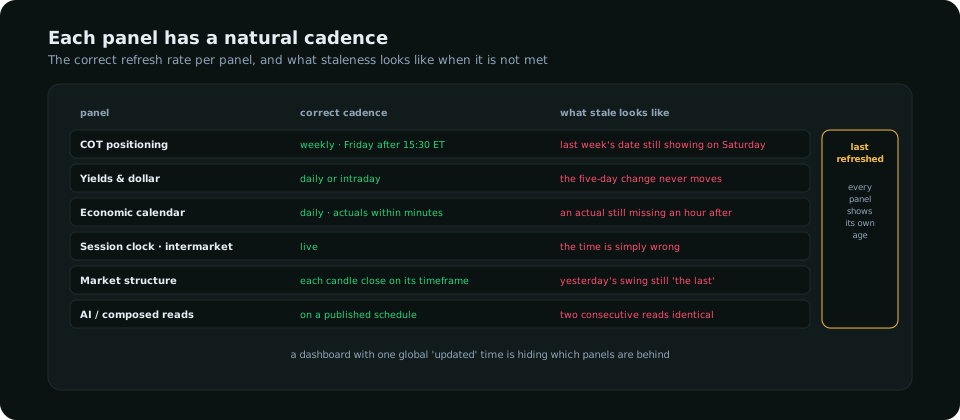
Positioning is weekly, yields daily, the calendar daily with actuals within minutes, the session clock live, structure at each close, a composed or AI read on a published schedule. A dashboard that stamps every panel with its own refresh time lets you judge each one; a dashboard with one global timestamp, or none, is asking you to assume. Ask specifically what happens when a source fails: the right answer is that the panel keeps its last good value and shows it as stale; the wrong answers are that it shows zero, shows nothing, or shows a number that looks current.
The panels that matter
| Panel | Must have | Nice to have | Decoration |
|---|---|---|---|
| Bias per pair | Composed from named inputs with visible weights; direction and strength | History of the bias; flips flagged | A single "sentiment" gauge with no inputs |
| Positioning | COT net, weekly change and index per market, with the report date | Gross long/short; the full history table | A broker's client ratio presented as "the market" |
| Dollar and yields | DXY, 2-year, 10-year, real yield with changes | Rate-path pricing per central bank | A dozen bond tickers with no changes |
| Calendar | In your zone; the next red release per currency with countdown; actuals filled fast | Scenario notes per release | A week-long wall of grey events |
| Session clock | London and New York windows in your zone, correct across clock changes | Killzone overlays | A world map of time zones |
| Structure per pair | Daily and four-hour trend, range position, nearest liquidity | A marked chart with validated levels | Indicator readings per pair |
| Risk | Risk per trade, open exposure by currency, today against the limit | Journal integration | Profit and loss in large type |
The dashboard guide explains why these eight panels and not others; this table is about what each panel must do to be worth paying for. The right-hand column is what to subtract from a sales page before judging it.
Time zones
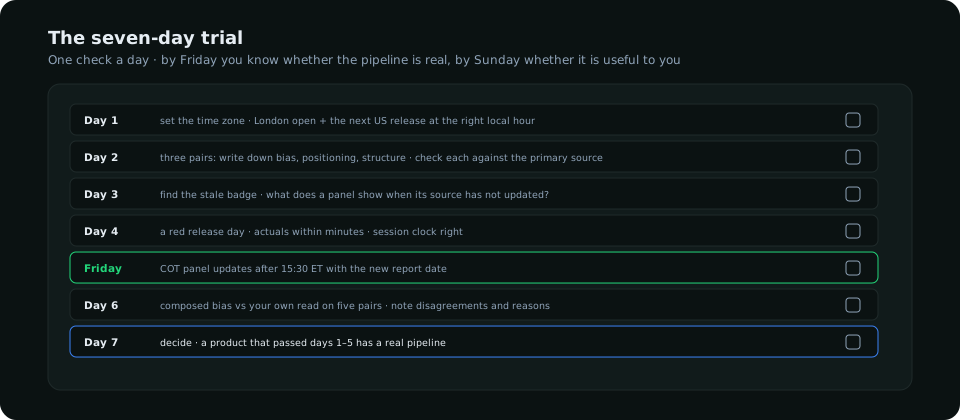
A dashboard built in New York and used in Karachi or Dubai is wrong by nine hours unless it converts, and wrong by an extra hour twice a year unless it handles both regions' clock changes. Check three things on the trial: the session clock shows London open at the right local hour today, the calendar shows the 12:30 UTC US release at the right local hour, and both are still right after the next clock change (or the product documents how it handles it). This sounds trivial and is the single most common defect in dashboards sold internationally.
Honesty: what does it refuse to claim?
The best signal of a trustworthy product is what it declines to say. A bias panel that shows "neutral" on indecisive days is more useful than one that always picks a side. An AI read that says NO TRADE when the evidence is thin, and shows which levels it dropped in validation, is more useful than one that always produces a setup. A calendar that marks a reaction as "typically 20–60 pips" rather than promising a direction is being honest about the limits of the data. Products that never say "no trade", never show a stale badge and never flag an input as missing are products that have decided you prefer confidence to accuracy.
Pricing and the trial
Monthly subscriptions between 30 and 100 dollars are typical for a dashboard that processes positioning and macro data; above that the product is competing with institutional terminals and should offer institutional data. Annual discounts are fine once the trial is passed; lifetime deals are a warning, because a data pipeline has running costs and a product that stops charging for them stops maintaining them. The trial itself should be free or refundable and long enough to see a Friday COT update and at least one red release.
Security basics
A dashboard holds your email, a password and a payment method; it should not need your broker credentials, and one that asks for them to "sync your trades" should be refused unless it uses read-only API keys you can revoke. Check for two-factor or device verification on login, a privacy policy that names what is stored, and a payment processor you recognise. These are low bars; a surprising number of products do not clear them.
Red flags
- Performance claims ("87% accuracy") with no definition of what was measured and no log.
- A single global "updated" timestamp, or none.
- Positioning data with no report date, or retail client ratios presented as market positioning.
- A bias that is never neutral; an AI read that never says no trade.
- Times shown in one fixed zone with no setting.
- Lifetime pricing; no trial; broker credentials requested.
SMC Terminal was built against this list: every panel shows its own refresh time and keeps its last good value when a source fails, the COT panel shows the report date, the calendar and session clock are in the member's zone, the bias says neutral when the inputs split, the AI chart read validates every level and says NO TRADE when the evidence is insufficient, and the admin's data-source page is the same one the pipeline reports to. The automation guide explains why those are the properties to look for, and the software comparison covers the broader category.
Frequently asked
What should a forex trading dashboard include?
A composed bias per pair, COT positioning with report dates, the dollar and yields with changes, a calendar and session clock in your zone, structure per pair, and a risk panel. Anything beyond that is optional; anything missing from that list is a gap you will fill with another tab.
How much should an online forex dashboard cost?
Thirty to a hundred dollars a month for one that processes positioning and macro data; the cost is in keeping the pipeline running, which is why lifetime deals are a warning rather than a bargain.
How do I know if a dashboard's data is real?
Check three numbers against their primary sources on day two of the trial, find the stale badge on day three, and watch the COT panel on Friday. A real pipeline passes all three; a screenshot does not.
Everything on SMC Terminal is analysis and education, not a recommendation to buy or sell. Figures in the example are illustrative. Trading carries a substantial risk of loss. Manage your risk.