Forex Analysis Software: Features Traders Should Compare
Charting platforms, research terminals, journaling tools and the broker's own app all call themselves analysis software, and they do different jobs. This comparison sets out what a forex trader's analysis actually consists of, maps each category of software to the part it covers, and lists the features worth paying for — and the ones that are marketing.
"Forex analysis software" is a phrase that covers four different products: the charting platform where you draw levels, the research terminal where you read positioning and macro data, the journal where you record what you did, and the broker's app where you execute. Most comparisons line these up as if they competed. They do not. The useful comparison starts from what analysis actually consists of for a forex trader, then asks which category covers each part, and only then which product in that category does it well.
What forex analysis consists of
Strip away the vocabulary and a complete analysis of a pair, before any trade, answers five questions in order.
- Direction: which way does the evidence lean over the next days to weeks? The dollar's drivers, the pair's positioning, the macro regime, the seasonal tendency.
- Confirmation: do the related markets and the exchange's volume and open interest agree that the move is being paid for?
- Structure: what is the chart doing — trend or range, where are the swings, zones and liquidity pools?
- Timing: when does this pair move, and what is scheduled that could change the answer?
- Size: given the stop the structure demands, how much is this trade allowed to lose?
A charting platform answers question three completely and question four partly. It answers questions one, two and five not at all, because the data is not in the price series — which is the structural limit the TradingView comparison explains. That is the whole case for a second piece of software.
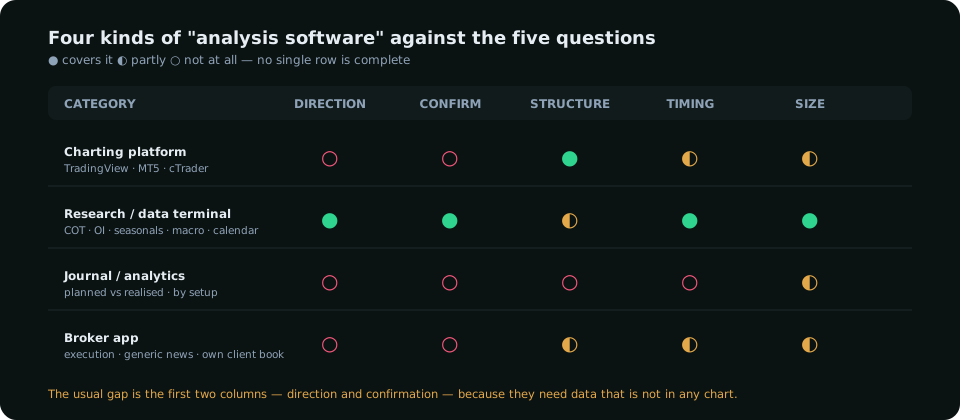
The four categories, honestly
Charting platforms
TradingView, MetaTrader, cTrader, and the charting inside broker apps. Their job is structure and timing: candles on every timeframe, drawing tools, indicators, alerts, replay. The best of them are excellent at it and cheap or free. Their limit is absolute: they see one symbol's price history. The platform guide compares them on execution and charting; for analysis, assume they cover question three and stop there.
Research and data terminals
The institutional versions cost more per month than most retail accounts hold; the retail versions are newer and narrower. Their job is direction and confirmation: the CFTC positioning report composed into pair reads, seasonal statistics with hit rates, the macro regime from real yields and the dollar, the economic calendar with each release's expected effect on each pair, and — the newest addition — exchange volume and open interest read against price. A good one composes these into one bias per pair with the evidence visible, so the trader can disagree with it. A bad one hides the composition and calls the output a signal.
Journaling and analytics tools
Their job is the feedback loop: planned versus realised risk-to-reward, win rate by setup, performance by session and pair. This is where the gap between planned and realised ratio becomes visible. A spreadsheet does the job for a discretionary trader; dedicated tools add broker import and tagging. Not analysis of the market, but analysis of the trader, and the second is where most improvement comes from.
The broker's app
Execution, account state, and whatever charting and news the broker licenses. Convenient, and the wrong place to do analysis: the news is a generic feed, the "sentiment" widget is the broker's own client book, and the charts are the broker's prices. Use it to trade, not to decide.
Features worth comparing
| Feature | Why it matters | What to check |
|---|---|---|
| Positioning data (COT) | The only public record of who is long and short | Composed into pairs? Percentiles, not raw counts? Which report version? |
| Open interest and volume | Whether a move is being paid for | Exchange-reported, daily, with history — not a broker's tick count |
| Seasonality | A weighted coin, useful as a size filter | Hit rates and sample sizes shown, not just an average line |
| Macro regime and calendar | Direction and the timing of risk | Per-pair expected moves per release; live, not admin-typed |
| Structure tools | Swings, zones, liquidity on the chart | Rules stated; settings fixed; verifiable by hand |
| A composed bias with evidence | The five questions in one place | Can you see why? Can you disagree with a component? |
| Sizing from the stop | The last line of every plan | ATR-based stop distance, per-instrument pip value |
| Data provenance | Whether you can trust the number | Named sources, refresh times, "preliminary" flagged where it is |
Features that are marketing
- "AI signals". A buy/sell arrow with the reasoning hidden. If the software cannot show the evidence, the arrow is a coin with branding.
- Hundreds of indicators. Six answer the chart's questions. The count is a feature for the vendor.
- "Institutional order flow" for spot forex. There is no central tape; the only real flow data is the exchange's futures volume and open interest and the CFTC report. Anything else labelled order flow is the vendor's reconstruction.
- Win-rate claims. A method's win rate means nothing without its average risk-to-reward, and a tool that quotes one without the other is choosing what to show.
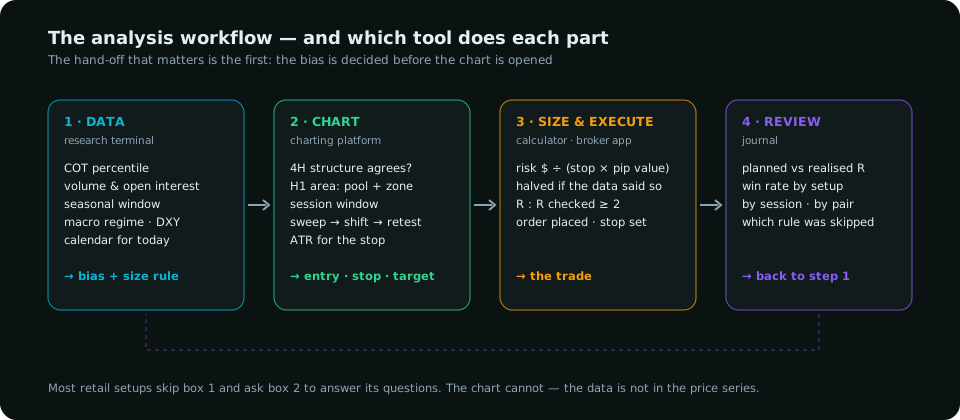
A scorecard to run before paying
- Pick two pairs you trade. For each, write the five answers — direction, confirmation, structure, timing, size — using the software you are evaluating and nothing else.
- Count the blanks. A charting platform will leave two or three; a research terminal should leave one (structure, which it may not try to do) or none.
- For every answer the software gave, ask whether you can see the evidence behind it. Count the ones where you cannot.
- Check one number against its source: a COT net position against cftc.gov, a seasonal hit rate against your own count, an open-interest figure against the exchange's report.
- Price the combination. Charting is cheap; data is where the cost sits, and the question is whether the two columns it fills are worth it to your method. For a session trader running structure setups off a data-set bias, they usually are; for a pure pattern trader, perhaps not.
Software does not make a trader. But the right division of labour — data for the decision, chart for the timing, journal for the review — removes the most common structural error in retail forex, which is asking the chart to tell you things it cannot know.
Everything on SMC Terminal is analysis and education, not a recommendation to buy or sell. SMC Terminal is a research terminal of the kind described; evaluate it, and every alternative, with the scorecard above. Trading carries a substantial risk of loss. Manage your risk.